Developers & Git Diffs
Compare config files, JSON responses, SQL migrations, or any code snippet without opening a terminal. Paste two versions and see exactly what changed — line by line, word by word. Faster than git diff for quick checks.
The fastest way to see changes between two blocks of text or code.
- let theme = "light";
initApp(theme);
+ const theme = "dark";
initApp(theme);
Free Online Tools
All tools run entirely in your browser — no uploads, no servers, no data stored. Instant, private, free.
Step-by-Step Guide
Compare documents, code, and PDFs instantly — no software needed, no account required. Your files never leave your device.
Files never leave your browser. Zero server uploads.
Myers diff algorithm — same as Git. Word-level accuracy.
PDF, DOCX, PPTX, plain text — all supported.
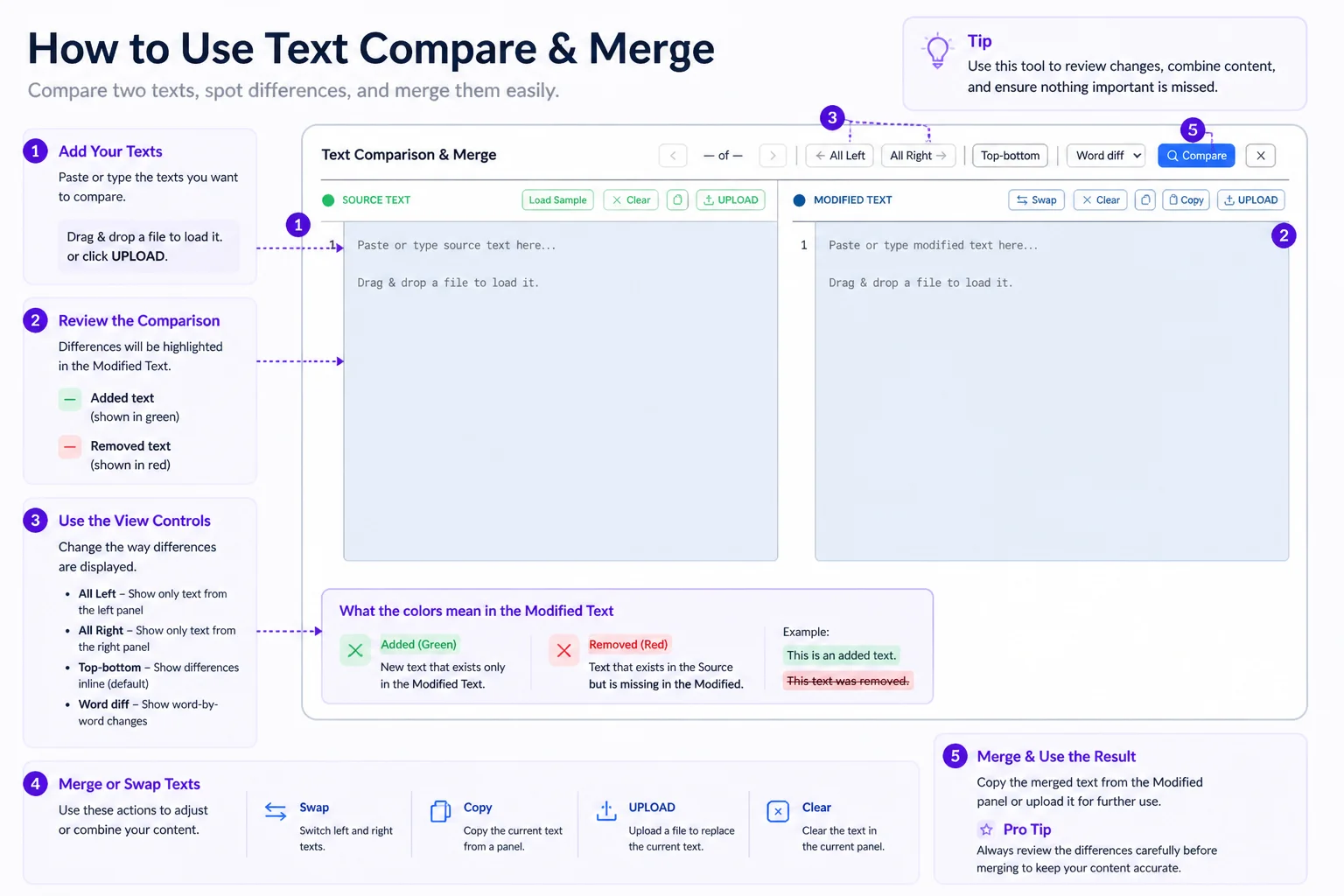
Drag and drop two files into the left and right drop zones — or click "Choose File" to browse. Supported formats include PDF, DOCX, DOC, PPTX, and plain text. You can also paste text directly into either panel for instant comparison.
Hit the "Compare" button to run the diff engine. Our tool uses the Myers diff algorithm — the same method Git uses — at word level. Processing happens entirely in your browser in milliseconds, even for large documents.
All changes are color-coded for instant scanning. Added text is highlighted in green, removed text in red (strikethrough in combined view). Navigate between changes using the jump buttons or scroll freely through the document.
Click "Export" to download a plain-text report listing every addition, deletion, and modification — perfect for attaching to pull request reviews, legal redlines, or academic revision notes. Zero data is retained after you close the tab.
Who Uses This Tool
From developers to lawyers, students to editors — anyone who needs to know exactly what changed between two versions.
Compare config files, JSON responses, SQL migrations, or any code snippet without opening a terminal. Paste two versions and see exactly what changed — line by line, word by word. Faster than git diff for quick checks.
Upload two versions of a Word document or paste draft text to track every revision. See insertions, deletions, and rewrites highlighted in seconds — without relying on Track Changes in Microsoft Word or Google Docs.
Compare contract versions, terms of service updates, privacy policy changes, or compliance documents. The Myers diff engine highlights every amended clause, added provision, and removed sentence — producing a reliable redline without manual markup.
Quickly reconcile two people's edits on the same document. Compare meeting notes, project briefs, or spec sheets before finalizing — without the overhead of version control systems. Great for remote teams sharing documents over email.
Compare thesis drafts, research paper revisions, or annotated bibliographies. See exactly which sentences were reworded after supervisor feedback. Track changes across submission rounds without losing context — no account, no citation data stored.
Maintain multiple tailored versions of your résumé or cover letter and compare them before sending. Make sure your targeted edits landed correctly — verify that the right version is polished and submission-ready without hunting through file versions.
Format Deep Dive
Different document types have different strengths for comparison workflows. Here's what to know.
| Feature | Side-by-Side View | Combined View |
|---|---|---|
| Best for | Reviewing two distinct versions simultaneously | Final proofreading and change summaries |
| Deletions shown as | Red highlight on left panel | Red strikethrough inline |
| Additions shown as | Green highlight on right panel | Green highlight inline |
| Reading flow | ✅ Easy to compare context | ✅ Single linear flow |
| Long documents | ✅ Best — scroll both panels | ⚠️ Can get dense |
| Legal redlining | ⚠️ Requires two-panel focus | ✅ Industry-standard redline style |
| Export format | Plain text diff report | Plain text unified diff report |
FAQ
Everything you need to know about our free text difference checker.
Yes. Everything runs entirely in your browser using PDF.js, Mammoth.js, and a JavaScript diff engine. Files never touch any server. No sign-up, no storage, no tracking — you can verify this by running a comparison while offline.
PDF (text-based), DOCX, DOC, PPTX, and plain text are all supported. For scanned PDFs or image files, use our Image to Text (OCR) tool first to extract content, then paste the result into either panel.
We use the Myers diff algorithm at the word level — the same method that powers Git's diff. It finds the minimum set of changes needed to transform one text into the other, producing the most readable and accurate set of additions and deletions.
Combined view merges both documents into a single unified view — deletions appear as red strikethrough text and insertions appear as green highlights inline. It's ideal for final proofreading, legal redlining, and producing a traditional tracked-changes style document.
Our comparison works on extracted text, not pixel data. For scanned or image-only PDFs, use our Image to Text tool first to OCR the content, then paste the extracted text into either panel as plain text.
Yes. Click the Export button to download a plain-text diff report listing every change with line references and a change count. This is ideal for attaching to pull requests, legal submissions, or academic revision logs.
There are no enforced limits. Very large documents (10,000+ lines) may take a moment to process depending on your device's speed. Most documents under 50 pages process instantly. Since everything runs locally, performance depends on your hardware.
Absolutely. Paste two versions of any code snippet, config file, JSON object, or log file into the panels. The word-level diff highlights exactly what changed — variable names, values, operators, and all — without needing a terminal or Git setup.
Explore More
All tools are browser-based, free, and require no sign-up.
Text & Comparison
Image Conversion
Your documents never leave your device. No account needed. No watermarks. No limits. Upload two files and see every difference highlighted in seconds.